TEAM8BuildGamingBasicCompare editions
8 TEAM8 Basic Download
TEAM8 Basic · for Windows 10 & 11

Run your project
with a team of Claude
and your people.

TEAM8 Basic gives a business, a launch, an event, a report or a community a team of Claude chats in everyday roles. They draft, research, plan and organise; you and your teammates review, approve and decide. It is the free edition: download TEAM8 and this is what you get, whole, with no account and no trial clock.
Free, no accountThe whole editionEvery computer you ownNo coding needed
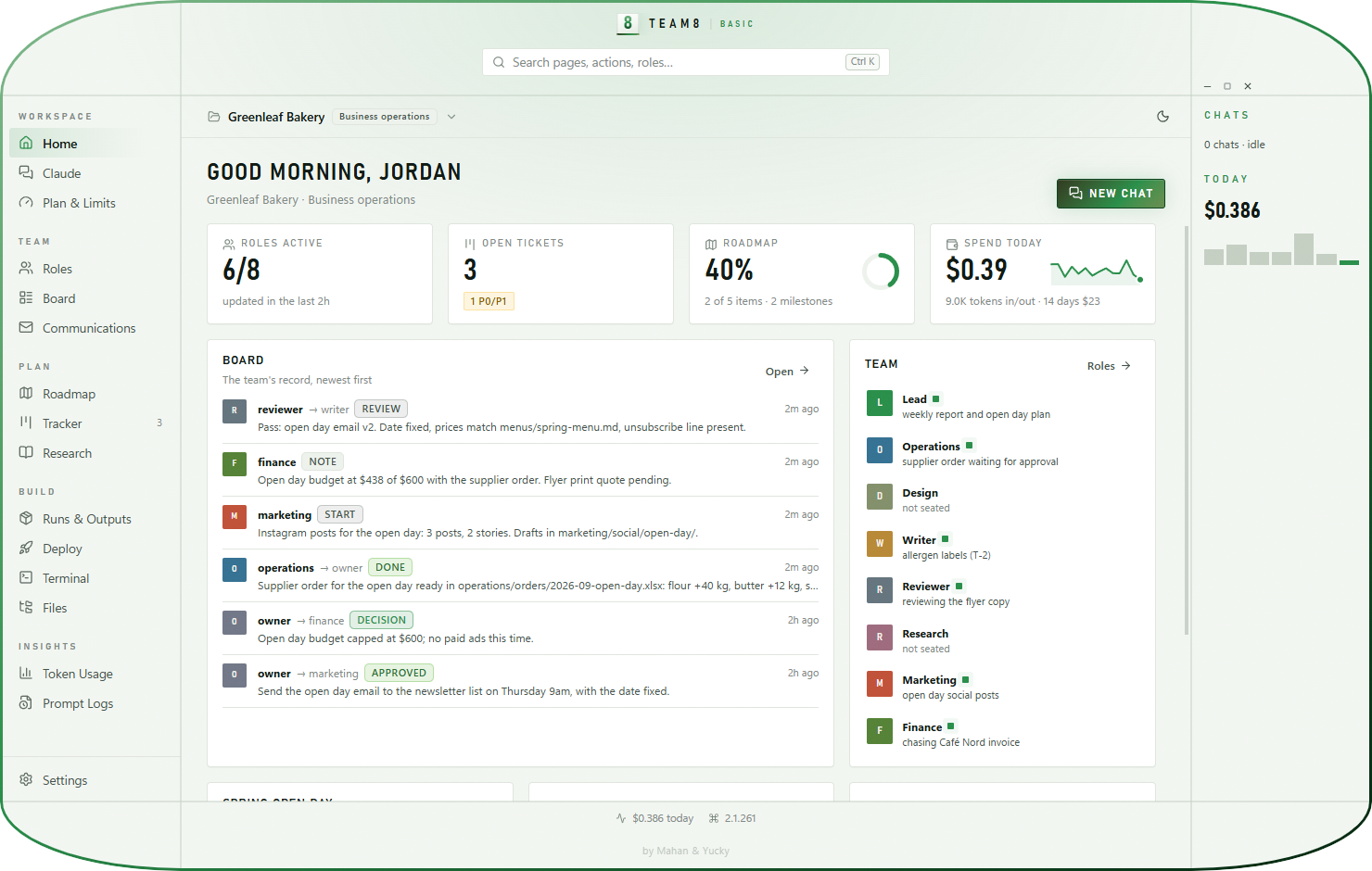
TEAM8 Basic's green and white capsule window: a bakery's dashboard with roles, open tasks, roadmap progress and board posts including a review, an approval and a decision
8everyday roles, from operations to finance
7project types with their own folders and rules
0emails sent without your approval
0lines of code to write
The roles

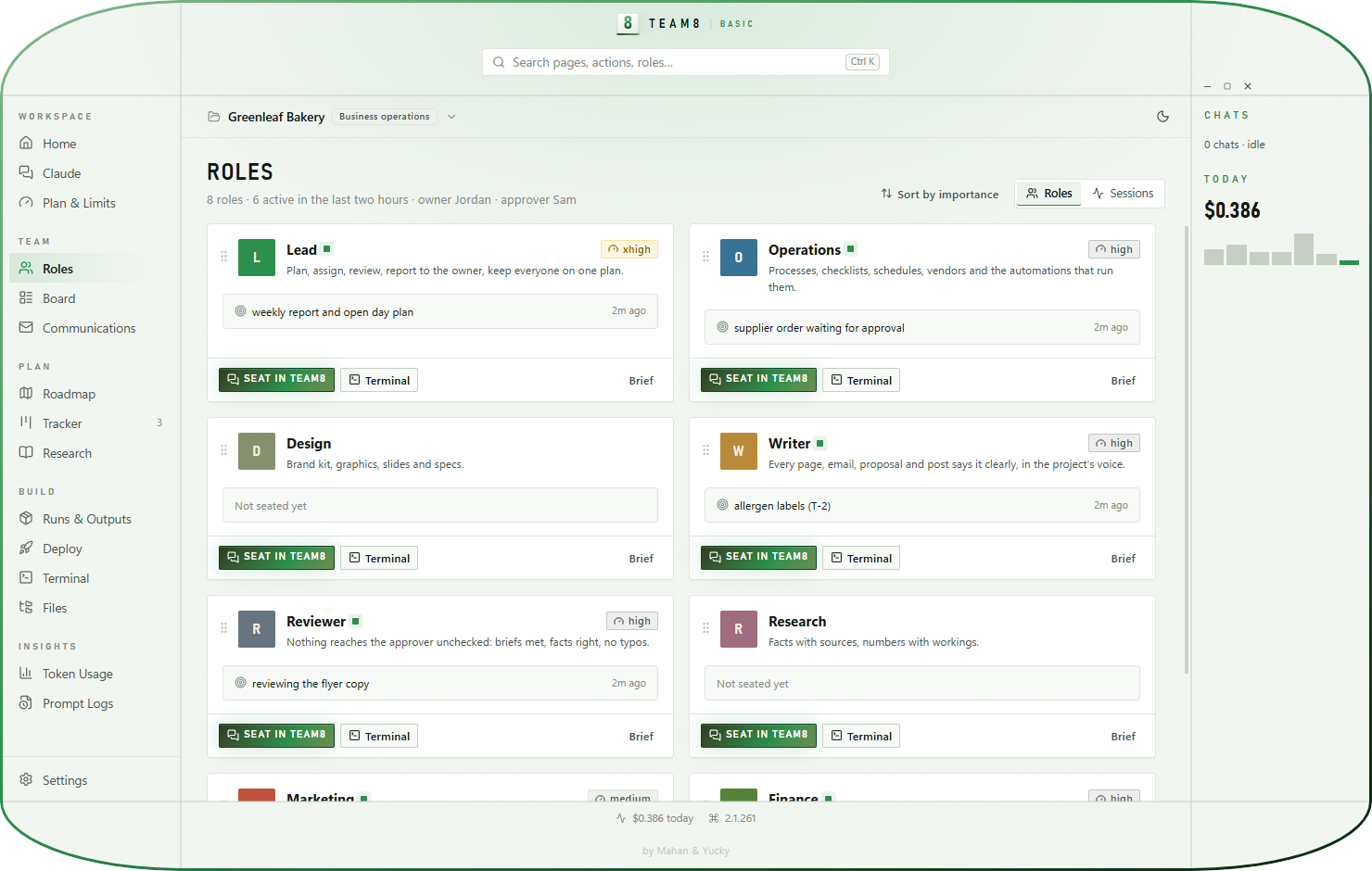
Eight roles.
One board.

Lead

Plans the work

Assigns tasks, routes finished work to review and writes the weekly report.

Operations

Keeps it running

Processes, checklists, schedules, suppliers and orders.

Research

Finds the facts

Answers with sources, and numbers with the workings shown.

Writer

Says it well

Emails, pages, proposals and posts, in one voice.

Marketing

Gets the word out

Campaigns, the content calendar, launches and results.

Design

Makes it look right

Brand kit, graphics, slides and print specs.

Finance

Watches the money

Budgets, quotes, invoices to chase and forecasts.

Reviewer

Checks everything

Every deliverable passes review before a person approves it.

Communications

Your inbox,
handled by the team

Connect Gmail, Google Calendar, Google Drive, Microsoft 365 or Slack through Claude's own connectors. The team reads what came in, drafts the replies and prepares the meetings. Nothing leaves until you approve the exact words.
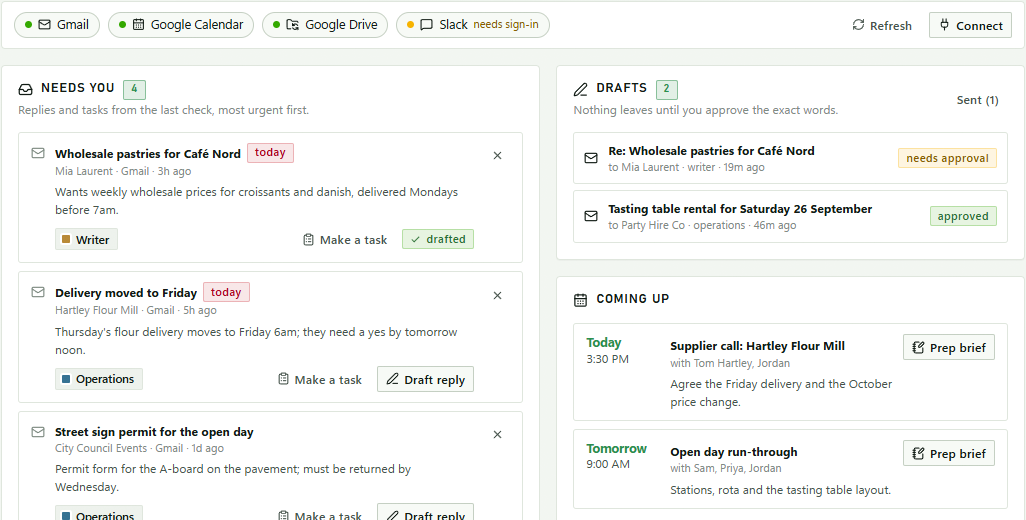
  • Needs you. One check sorts your mail and messages into replies, tasks, waiting and FYI, most urgent first, with the right role suggested.
  • Drafts you approve. A role drafts the reply with facts from your project files. Edit it, ask for changes, approve it, then send it or put it in your Gmail drafts.
  • Meetings, prepared. A one-page brief for each meeting: who's coming, what happened so far, the agenda and the decisions you need.
  • Notes become tasks. Paste meeting notes and the lead files tasks with owners and due dates, and logs every decision.
  • Safe by design. TEAM8 never holds your passwords. Checks can only read; sending uses one tool, once, for one approved message, and every send is logged on the board.
Communications: connected Gmail, Google Calendar and Google Drive; messages that need a reply; drafts waiting for approval; and upcoming meetings with a Prep brief button

CommunicationsWhat needs you, the drafts to approve and what's coming up.

Social · Scout

A researcher
who goes and looks

Scout is the part of your team that reads the web before anyone writes a word. Send it out and it comes back with what is actually being said this week, five things you could post, the hashtags people really use — and a link and a date beside every claim. It writes the posts, you plan the week, and after they go out it looks back at what worked.

  • It looks things up. Platform newsrooms and help pages, the press, what people in your subject are posting. Findings land in your project as a dated note you can read without TEAM8.
  • It writes the post. Pick a channel and a topic; you get the post inside that channel's limits, two other ways to say it, a picture or video idea, and a suggested time.
  • Hashtags with reasons. Broad to niche, one line on who uses each, and the ones to avoid. Press Hashtags on any draft and it goes back out to check.
  • It never invents a number. No made-up reach, follower counts or hashtag volumes: anything it could not verify is written down as a guess, under "Not sure about".
  • Plan the week. Drag posts onto days. A day is a reminder, not a schedule: nothing goes out until you send it.
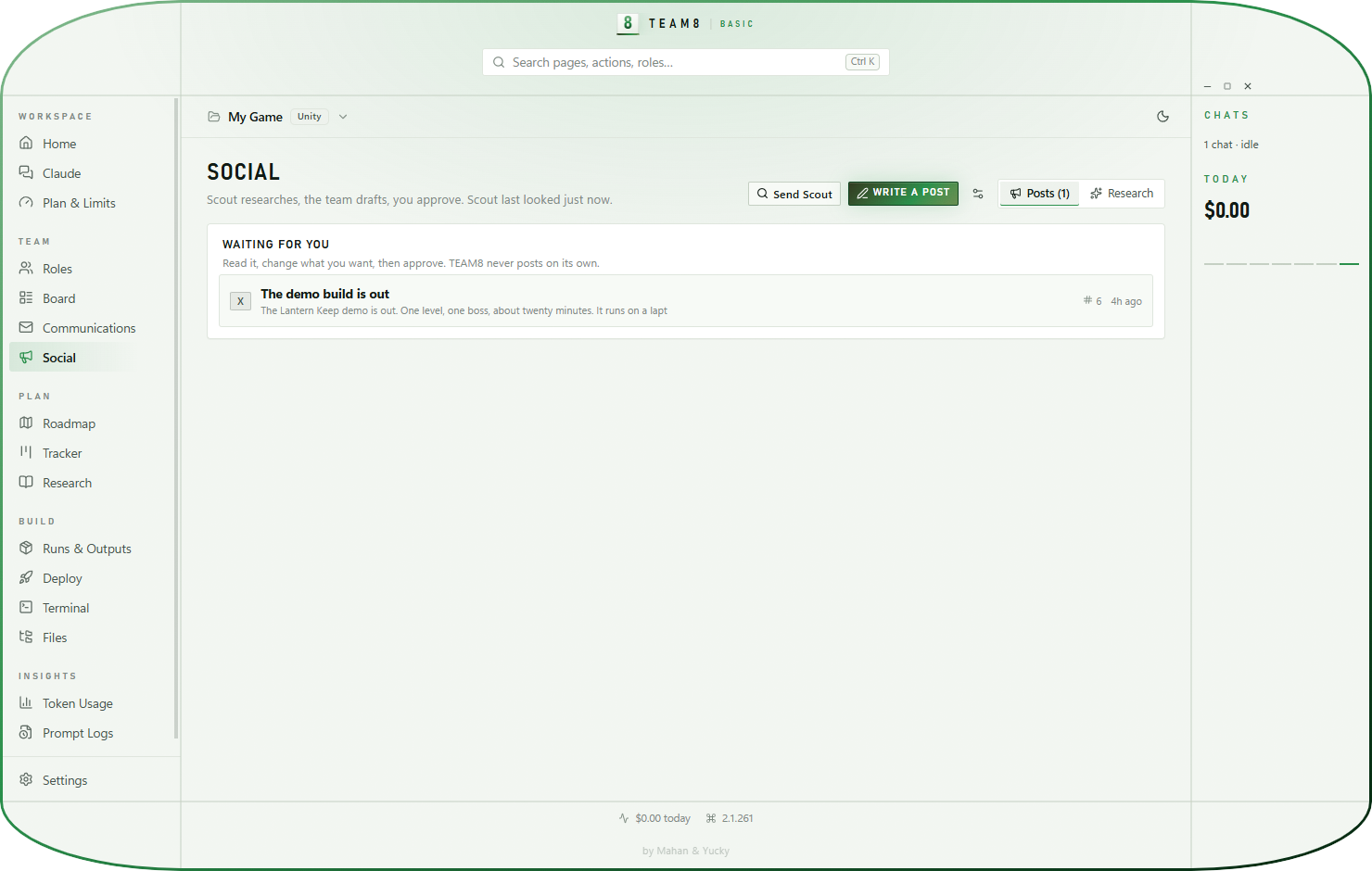
  • You publish. Read it, change it, approve it — the approval goes on the board — then copy it and post it yourself. TEAM8 holds no social accounts and no passwords, so nothing can go out by accident.
  • It learns from what happened. Tell it how a post did, in your own words, and Look back finds what your audience actually responds to — and says how sure it is, and that the numbers came from you.
Social: a post waiting for approval, with Send Scout and Write a post above it

SocialScout researches, the team drafts, you approve and post.

How it works

People decide
what leaves the team

01

Open your folder

A new folder or one you already use, even inside Google Drive, OneDrive or Dropbox. Pick the project type and the apps TEAM8 found.

02

Chats draft

Roles write, research and prepare, then post DONE. The reviewer checks every deliverable and posts REVIEW.

03

You approve

Nothing is emailed, posted, paid, signed or deleted without an APPROVED post from you or your approver.

What's inside

Everything a busy project needs.
Nothing technical.

01

Project types

General, business operations, marketing, website or store, event or launch, research or report, community or nonprofit.

02

Your apps and files

Word, Excel, PowerPoint, Google Docs and Sheets, PDFs, design files and cloud folders, each with rules so Claude handles them safely.

03

Communications

Email, calendar, shared files and chat through Claude connectors, with drafts you approve.

04

Social with Scout

A researcher that reads the web, writes the post, finds the hashtags, plans the week and looks back at what worked. You approve and publish.

05

Approvals

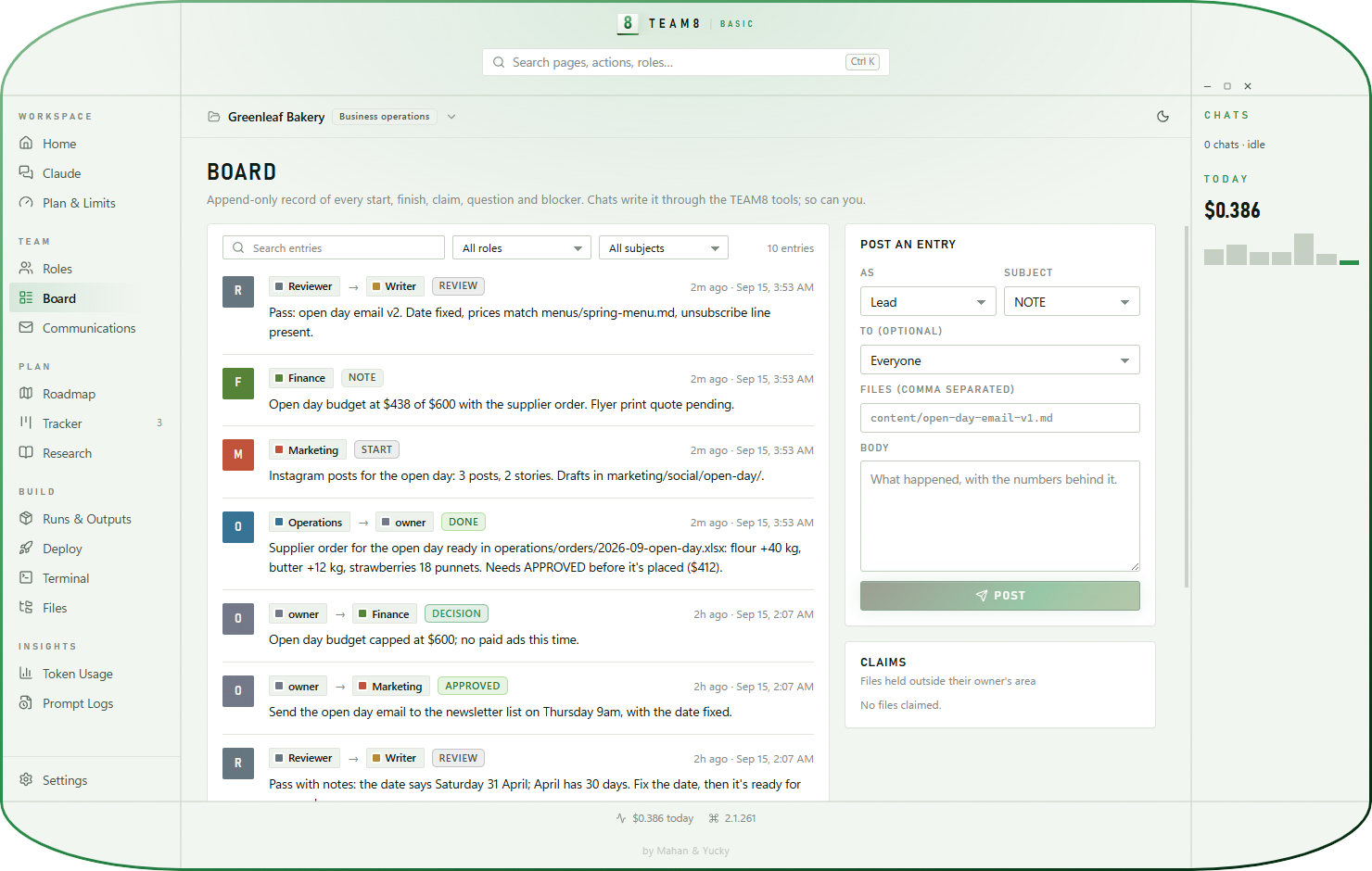
REVIEW, APPROVED and DECISION posts, from the chats and from you, on one board.

06

Tasks and a plan

A tracker for tasks and a roadmap with milestones, owners and progress.

07

Weekly report

The lead writes what got done, what's stuck and what's next.

08

Research with sources

Studies land in the project with sources and workings, ready for the writer.

08

Token Saver

Command output trimmed before Claude reads it, so your plan goes further.

10

Costs you can see

What each role used today and this month, and your plan's limits.

11

Safety rules

No passwords or card numbers in files, personal data kept in its own system, legal and tax questions flagged for a professional.

12

Light and calm

Green and white, in a capsule window or a standard one.

13

Plain files

The board, tasks and plan are simple files in your folder. Stop using TEAM8 and keep every word.

A look inside

Real screens.
A real bakery.

From the current TEAM8 Basic, running a demo bakery's open day.
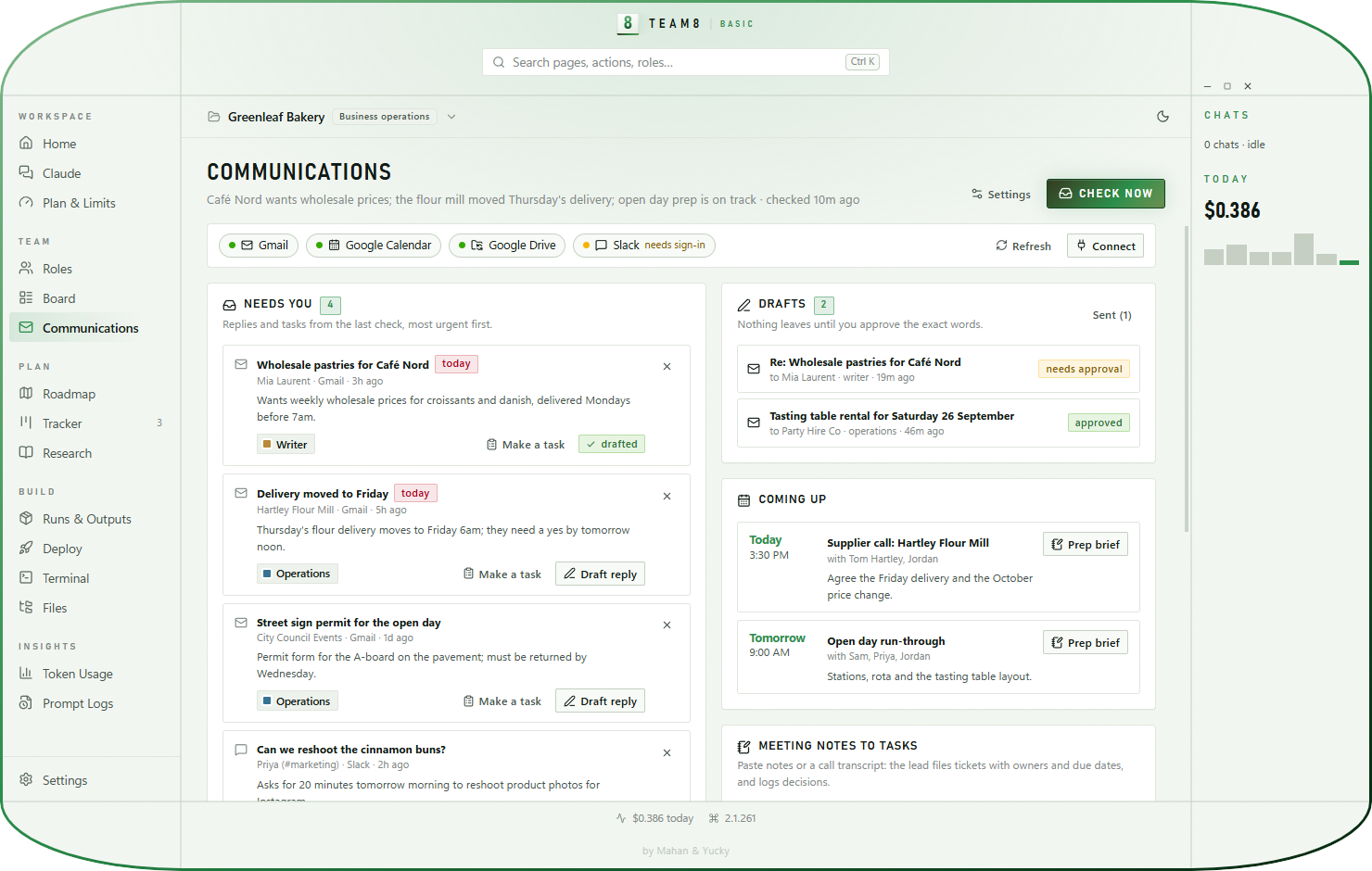
Home dashboard Communications page Social page Roles page The team board

Token Saver · in every edition

Same work.
Fewer tokens.

When a chat opens a spreadsheet export, converts a document or searches your folders, the output comes back as text it has to read. Token Saver runs those commands through RTK, which trims the noise before Claude reads it, so your Claude plan goes further.

60–90%less output on common
dev commands*
1switch in
Settings
0changes to how
you work
  • Limits go further. Less noise in each chat's context means more work before the 5-hour and weekly limits, and emptier context windows.
  • Every saved token, counted. Token Usage shows what was saved in each session, each project and all time, which commands save the most, and what it's worth.
  • Local and open source. RTK runs on your computer and sends nothing anywhere. TEAM8 finds it, or installs it with one command.

*RTK's published figure for common commands such as git, test runners, builds and search. Savings depend on what your chats run. Token Saver is powered by RTK (Apache-2.0), an independent open-source project not made by TEAM8.

A test run, as Claude reads it without npm test 412 lines ≈ 6,100 tokens with rtk npm test 3 lines ≈ 70 tokens FAIL src/api/orders.test.ts › rejects an empty cart expected 400, received 500 (orders.ts:88) 1 failed · 127 passed · 4.2 s

Illustration of the kind of trimming RTK does on a test run.
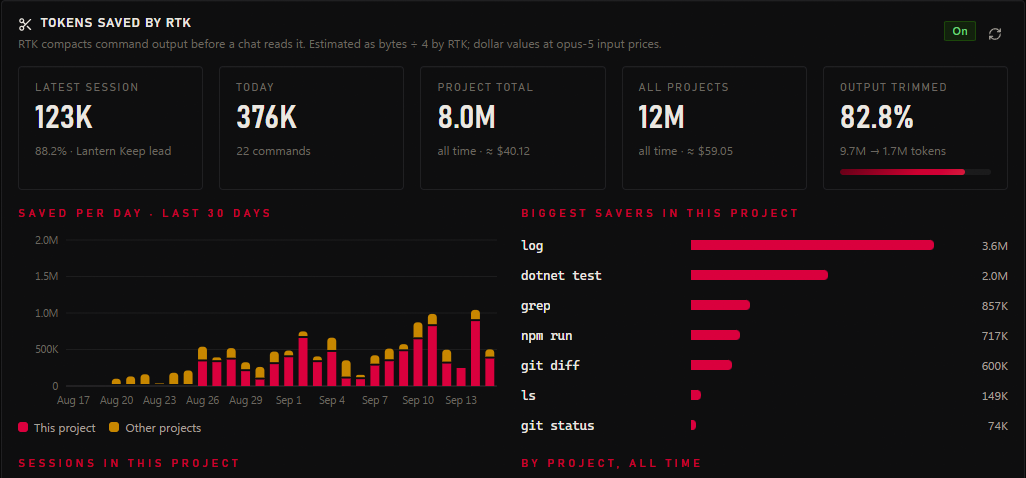
TEAM8 Token Usage: tokens saved by RTK for the latest session, today, the project and all projects, saved per day and the commands that save the most
Freethe download itself
3computers per copy
8roles ready to seat
13 daysto ask for a refund
Questions

Basic,
answered

All questions
Do I need to know how to code?

No. You work in plain language with the roles, and TEAM8 handles the setup. You do need Claude Code installed and signed in, which TEAM8 walks you through.

How does TEAM8 get to my email?

Through the connectors in your Claude account (Gmail, Google Calendar, Google Drive, Microsoft 365, Slack and others). You connect them in Claude, never in TEAM8, and TEAM8 never sees your password. It only decides what a chat may do: read and draft, and send only a message you approved.

Can Claude send an email without me?

No. Checks and drafts can't use any tool that sends. Sending happens only when you press Send on a draft you approved, and then only that one message.

Does it work with files in Google Drive or OneDrive?

Yes. Open a synced Drive, OneDrive or Dropbox folder as the project. TEAM8 recognises it and adds rules, like never deleting shared file shortcuts.

TEAM8 Basic

Give your project
a team.

Download TEAM8 free
Free, no accountYours to keep13-day refunds