TEAM8BuildGamingBasicCompare editions
8 TEAM8 Build Buy a key $99
TEAM8 Build · for Windows 10 & 11

A team of Claude
on one codebase,
without the mess.

One chat is a helper. Eight are a pile-up: the same files edited twice, decisions nobody can find, and a bill you only read afterwards. TEAM8 Build seats Claude Code chats as tech lead, backend, frontend, platform, security, QA and docs — each owning its own paths, claiming a file before it touches it, and writing what it did into your repository where your developers can read it.

One key, one paymentUnlocks the free download3 computersWindows 10 & 11
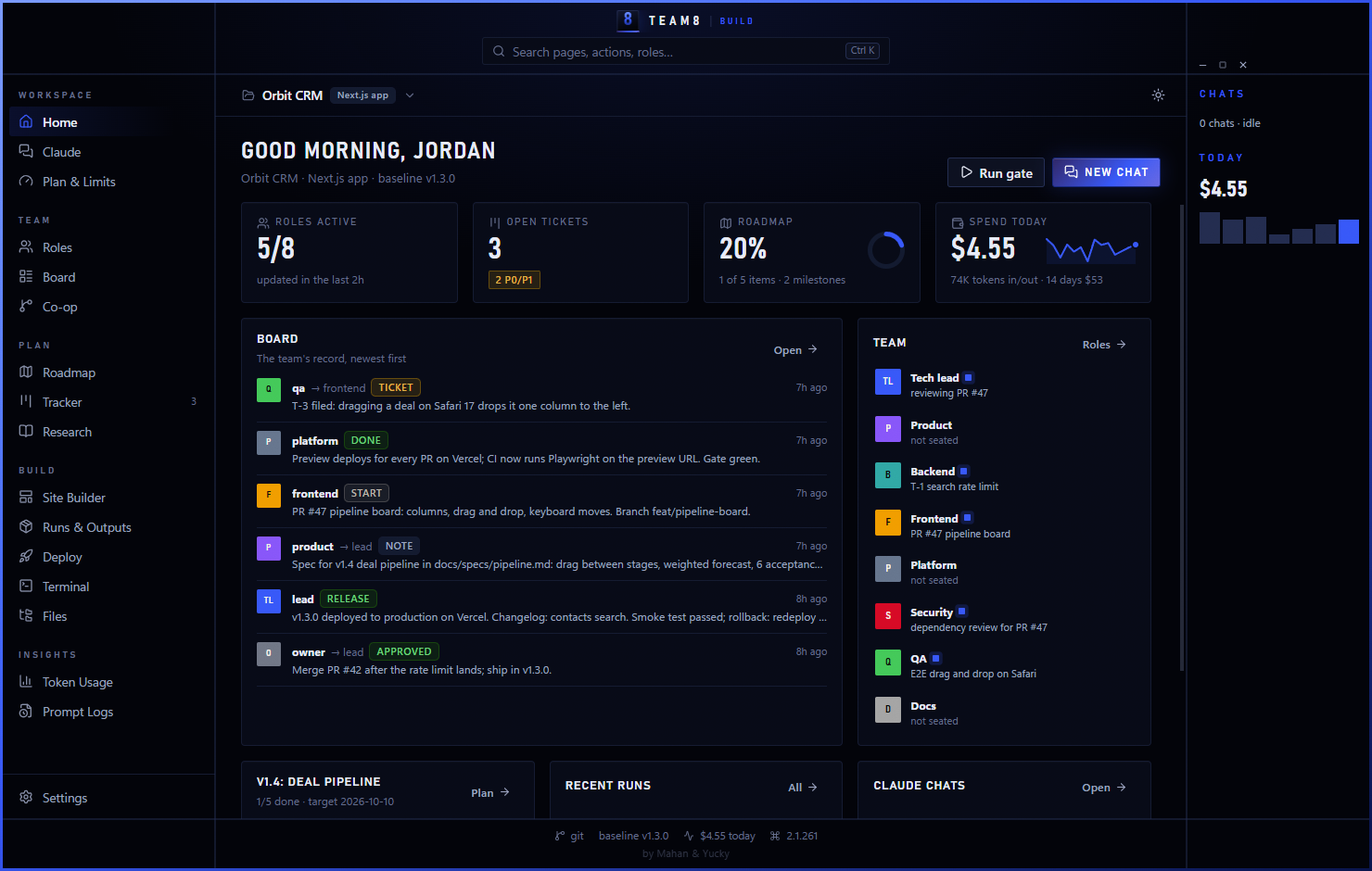
TEAM8 Build's box window in royal blue and black: the Orbit CRM dashboard with roles at work, open tickets, roadmap progress, today's spend and board posts from a ticket to a release
20stacks recognised, with their checks
30+tools and services, each with rules for Claude
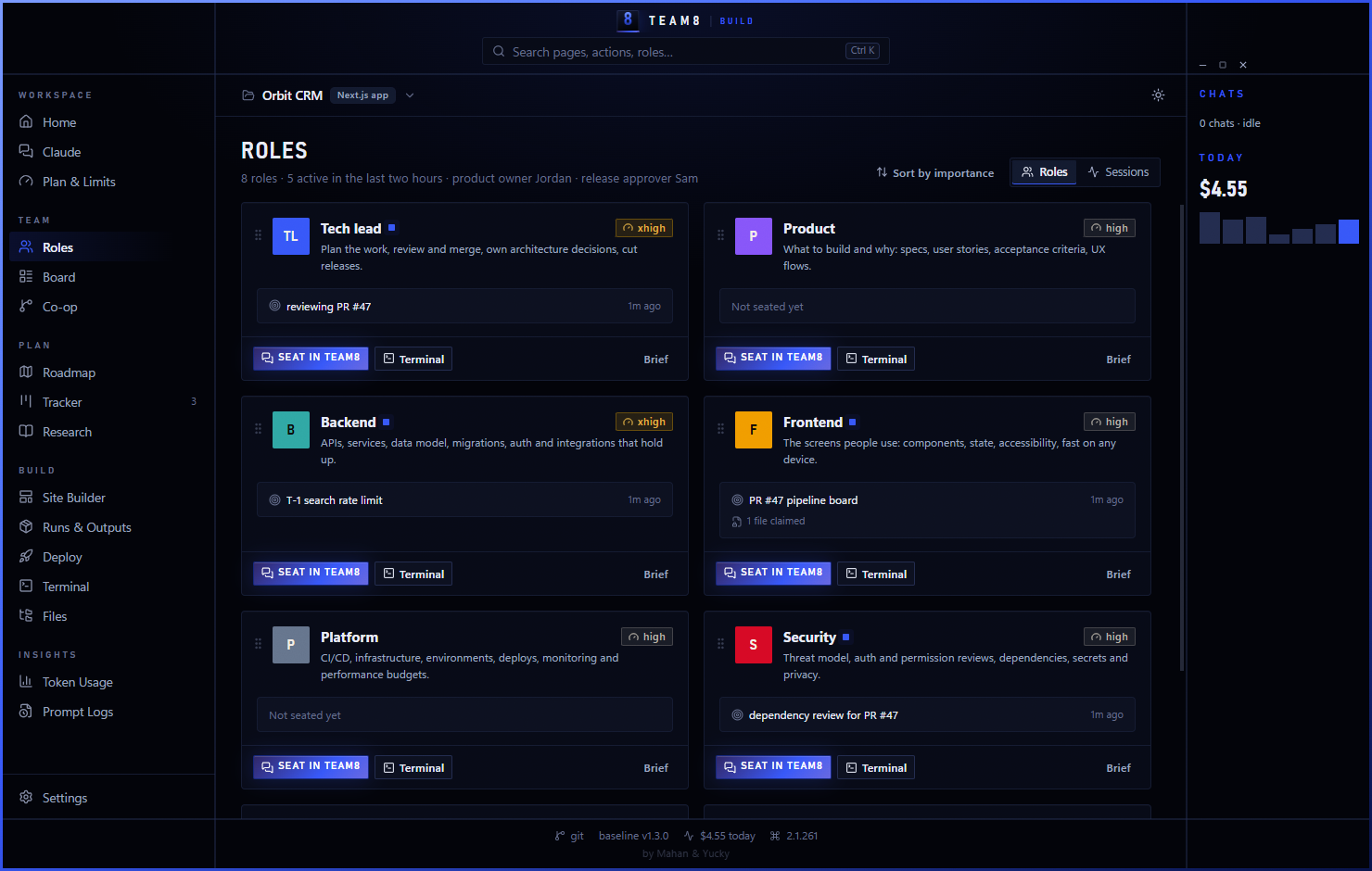
8software roles ready to seat
0merges or releases without a person's OK
Why it holds together

Three things keep
a team of chats honest

Seating eight Claude chats is the easy part. These are the parts that stop them tripping over each other, and they are the reason TEAM8 exists.

01

The record lives in your repo

The board, tickets, roadmap, decisions and file claims are Markdown and JSON committed next to your code. Every chat reads them, every developer reads them, git merges them — and they are still readable the day you stop using TEAM8. No database of ours holds your project.

02

No two chats in one file

Each role owns its paths. Before a chat touches anything outside them it claims the file, and a chat that reaches for a claimed file is stopped by a hook in Claude Code, not by a line in a prompt. Your developers are in the same record, so a chat is warned off what a person is already working on.

03

Each role costs what it should

TEAM8 reads your own Claude plan and its live limits, then recommends a model and effort per role — Opus for the tech lead, Haiku for docs — and applies it in one click. Between tasks it compacts each chat back to its brief, claimed files and open tickets, so a long-running role stops dragging a full context window behind it.

Underneath, it is still a team of Claude chats you can watch work: replies, tool calls, checks and costs streaming in the window, with a person's approval required before anything merges or ships.

How the team ships

Claude writes the code.
People ship it.

01

Branch and build

Every task gets a branch and a pull request. The role claims the files it touches, so frontend and backend never collide.

02

Checks, then review

Lint, typecheck, tests and build must pass before a chat posts DONE. Another role reviews; security reviews anything touching sign-in, secrets or new dependencies.

03

Approve and release

Your release approver posts APPROVED before anything merges to main or reaches production. The release post carries the version, changelog and rollback plan.

New · Site Builder

An AI website builder
that edits your code

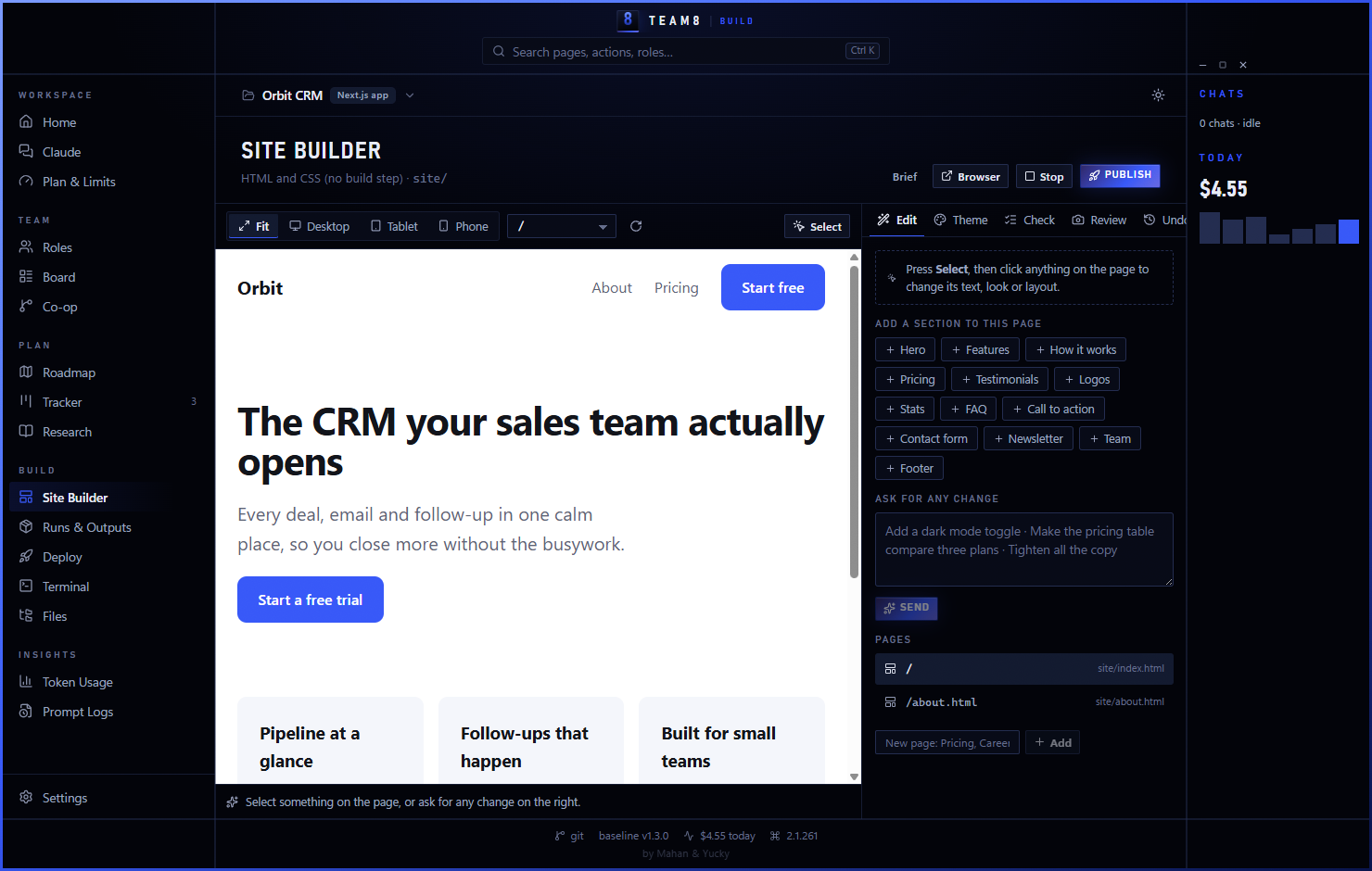
Describe the site and Claude builds it in your repository while you watch it live. Then change it the way you'd point at a screen. It's real code in your project, not a locked template.

  • Click to change. Select anything on the live page and say what you want. Change a button's text and it's saved straight into the source, instantly and with no tokens.
  • Live theme, zero tokens. Try colour presets, fonts, corner radius, spacing and width on the running site. Nothing touches your code until you press Apply.
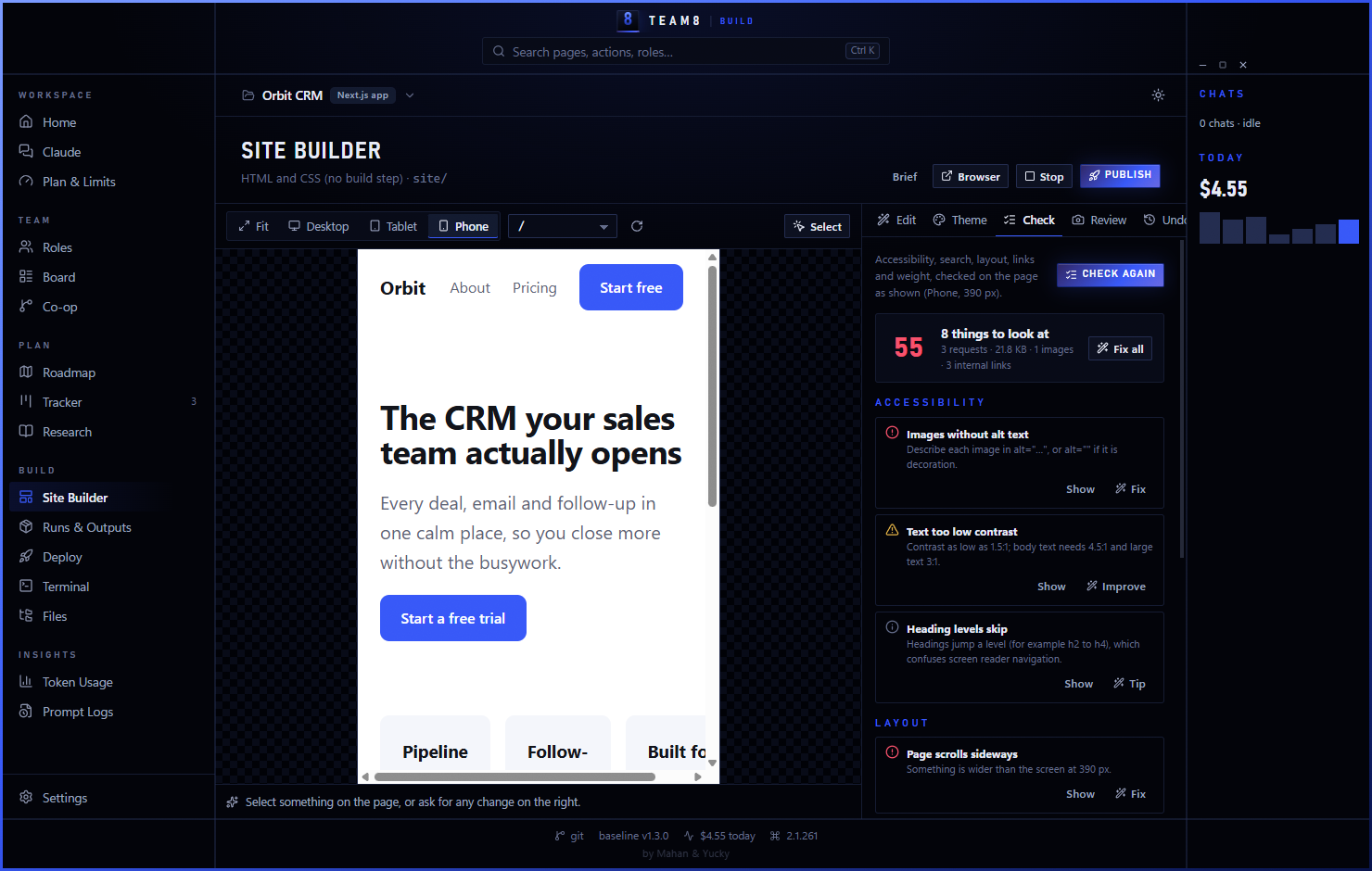
  • Site Check. Accessibility, search tags, broken links, contrast, sideways scrolling on phones and heavy images, found on the page itself, each with a Fix button.
  • Design review from screenshots. TEAM8 shoots the page at desktop, tablet and phone widths; Claude critiques it like a senior designer, then fixes the top issues.
  • Undo anything. The site is saved before every change, so any version is one click away.
  • Any stack. Plain HTML and CSS, Astro, Next.js, Vite + React, or the stack you already have, with its dev server previewed inside TEAM8. Publish through Deploy.
Site Builder with the live preview at phone width and the Check tab listing accessibility and layout problems with Fix buttons

Site Check at phone widthEvery problem found on the live page, with a Fix button.

What's inside

A software team's tools.
One window.

01

Stack detection

Next.js, Vite, Node APIs, React Native, Electron and Tauri, Django, Go, Rust, Kotlin, Swift, Flutter, .NET, Rails, Laravel, C++ and monorepos, each with its own checks.

02

Tools and services

GitHub, GitLab, CI, Docker, Kubernetes, Terraform, Prisma, Supabase, Vercel, Netlify, AWS, Sentry, .env files and more, each adding rules for Claude.

03

Code ownership

Every role owns its paths. Claims keep chats out of each other's files, and "who's working on what" warns your developers too.

04

Checks that match CI

Lint, typecheck, tests and build run from Runs & Outputs with logs and a clear pass or fail, before any DONE.

05

Reviews and releases

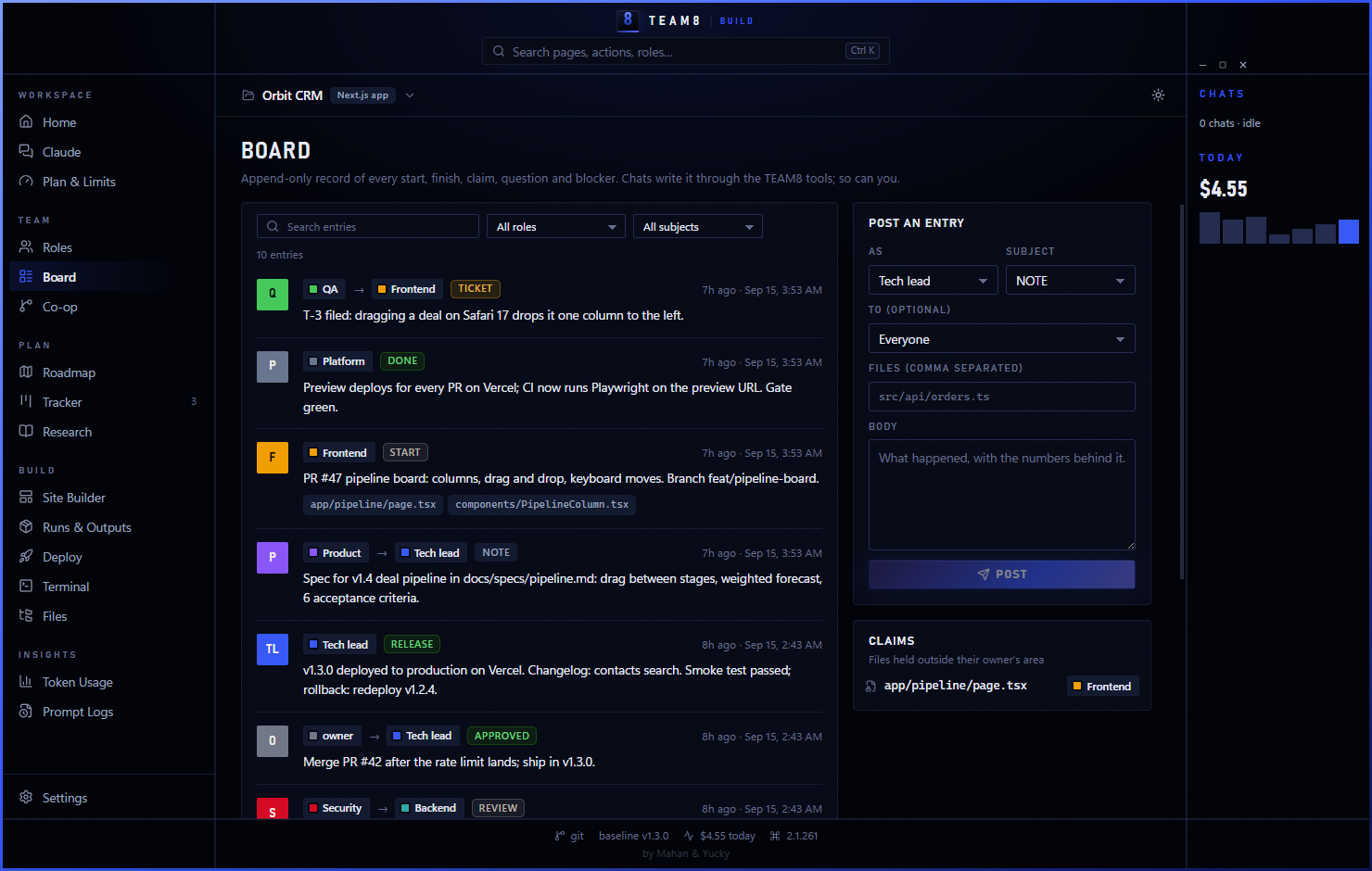
REVIEW, APPROVED and RELEASE posts on the board, architecture decision records and an incident procedure.

06

Security role

Threat model, auth and dependency reviews, secret handling and privacy checks, built into the flow.

07

Site Builder

Build and edit a website live: click to change, live theme, Site Check, screenshot design reviews and undo.

09

Token Saver

Test runs, builds, diffs and searches trimmed before Claude reads them, with the savings counted.

09

Co-op with git

Pull and push from the title bar, patch notes on every push, and live "who's working on what" for your developers.

10

Deploy

Vercel, Netlify, Cloudflare Pages, GitHub Pages, your own server or any deploy command, with one button.

11

Usage & limits

Cost per day, model, role and session; your plan's limits; how full each chat's context is.

12

A tall box window

Deep royal blue and black, built to sit beside your editor. A standard window is one switch away.
A look inside

Real screens.
Real build.

From the current TEAM8 Build, running a demo Next.js CRM.

Home dashboard Site Builder with a live preview of a landing page The team board with review, approval and release posts Roles: tech lead, product, backend, frontend, platform, security, QA and docs

Token Saver · in every edition

Same work.
Fewer tokens.

npm test, cargo build, a git diff of a refactor, a grep across src: every command a chat runs comes back as text it has to read, and most of it is noise. Token Saver runs those commands through RTK, which keeps the failures, errors and changed lines, and trims the rest before Claude reads them.

60–90%less output on common
dev commands*
1switch in
Settings
0changes to how
you work
  • Limits go further. Less noise in each chat's context means more work before the 5-hour and weekly limits, and emptier context windows.
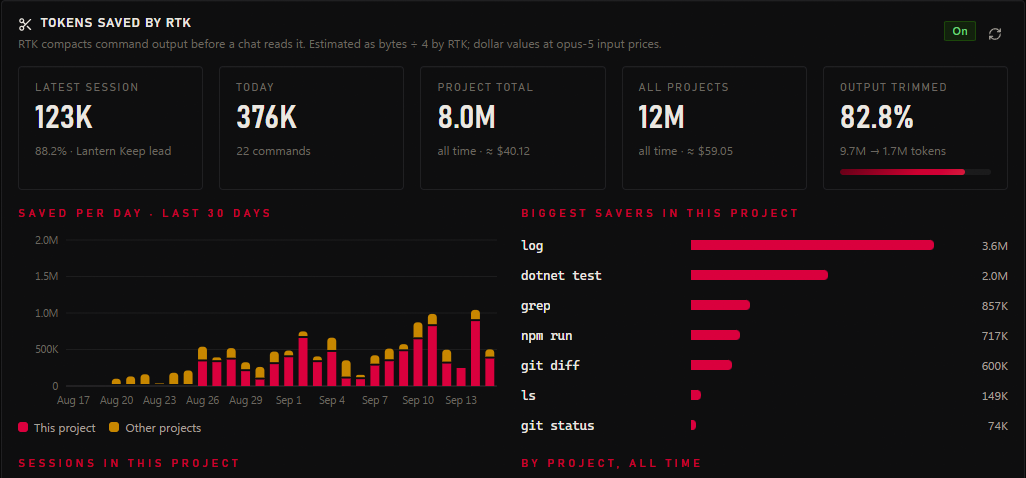
  • Every saved token, counted. Token Usage shows what was saved in each session, each project and all time, which commands save the most, and what it's worth.
  • Local and open source. RTK runs on your computer and sends nothing anywhere. TEAM8 finds it, or installs it with one command.

*RTK's published figure for common commands such as git, test runners, builds and search. Savings depend on what your chats run. Token Saver is powered by RTK (Apache-2.0), an independent open-source project not made by TEAM8.

A test run, as Claude reads it without npm test 412 lines ≈ 6,100 tokens with rtk npm test 3 lines ≈ 70 tokens FAIL src/api/orders.test.ts › rejects an empty cart expected 400, received 500 (orders.ts:88) 1 failed · 127 passed · 4.2 s

Illustration of the kind of trimming RTK does on a test run.

TEAM8 Token Usage: tokens saved by RTK for the latest session, today, the project and all projects, saved per day and the commands that save the most
$99once, for the key
3computers per copy
20stacks recognised
13 daysto ask for a refund
Questions

Build,
answered

All questions
Will Claude merge or deploy on its own?

No. The team protocol requires an APPROVED post from a person before anything merges to main, releases or touches production, and TEAM8 chats can't answer permission prompts, so commands you haven't allowed are refused.

Does it work with my existing repository?

Yes. Open the folder: TEAM8 detects the stack and the tools you use, proposes checks that match your CI, and adds a team/ folder and rules to CLAUDE.md. Nothing already there is overwritten.

What does the Site Builder make?

Real code in your project: plain HTML and CSS, Astro, Next.js, Vite + React, or your existing web stack. You own it, host it anywhere, and edit it with or without TEAM8.

Do my developers need TEAM8 too?

Only the people who want the app. Everyone else sees normal branches, pull requests and plain team files in the repository.

TEAM8 Build

Ship with
your team.

Buy a Build key $99
One-time paymentYours forever13-day refunds